
Turn Simple Switches Into Anything
If you can press a button, you can control a computer. That’s the idea behind accessibility switches — the big, easy-to-press buttons used in assistive technology. The tricky part has always been connecting a switch to a computer and deciding what it should do. The TRRS Trinkey Configurator makes that part simple.
What it is
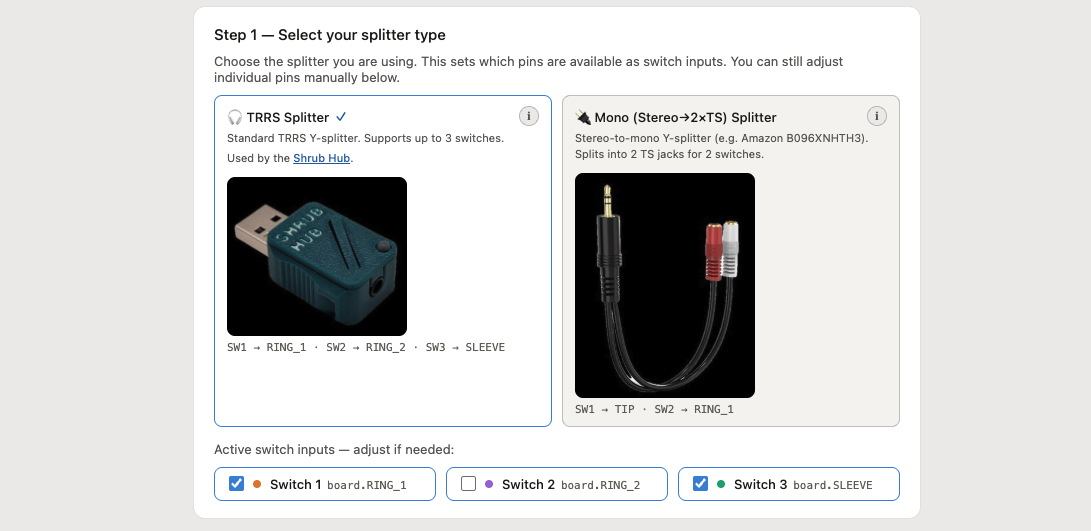
It’s a tiny USB device paired with an easy web tool. You plug an accessibility switch (or up to three) into the device using an inexpensive audio splitter, and the web tool lets you choose what each switch does — no coding required. When you’re finished, you download a small settings file and drag it onto the device. That’s it.
Because it acts like an ordinary keyboard or mouse, it works on just about anything — Windows, Mac, Chromebooks, tablets — with nothing to install.
What your switches can do
Each switch can be set to:
- Press a key or keyboard shortcut (Enter, Space, arrow keys, and more)
- Control media (play/pause, next track, volume)
- Click the mouse
You can even set up multiple modes. One switch is your “mode” switch: tap it normally for its usual action, or hold it down to switch modes. A small light on the device changes color so you always know which mode you’re in. With four modes, three switches can do twelve different actions.
Easy to set up
The web tool walks you through it in a few clicks: choose your splitter, pick what each switch does, and download your settings. The whole interface is clean, works in light or dark mode, and is built to be accessible.
Prefer a ready-made device?
If you’d rather not wire anything yourself, the Shrub Hub by Makers Making Change is a finished, open-source switch interface that works perfectly with this tool.
See it in action
Here’s a short walkthrough video: Watch on YouTube.
Resources
- GitHub Project & Configurator
- Walkthrough video: YouTube
- Ready-made device (Shrub Hub): Makers Making Change
- Open-source assistive tech community: makersmakingchange.com